
App guide
Click Drop
Lose the click. Keep the time. Click Drop alternates measures of metronome with measures of silence, so you find out what your time actually does when nothing is holding it up.
- Build
2026-08-01.4- Open the app
- clickdrop.backwerdrhythmshop.com
- Account or install
- None
- Cost
- Free forever
What this app does
Click Drop plays a repeating cycle made of two kinds of measure: a check measure, where you hear the subdivision, and a silent measure, where you do not. You keep playing through both. When the check returns, you hear immediately whether you drifted, and in which direction.
Click Drop never listens to you. It has no microphone access and no scoring of your playing — the check measure is the feedback, and your ears do the judging.
What you can practice
- Holding a steady pulse through silence of increasing length
- Noticing the direction of your drift, not just that it happened
- Internalising a subdivision rather than following one
- Staying composed when the reference disappears mid-phrase
How to use it
- Choose Practice or Challenge.
- Set the tempo — 40–240 BPM, by slider, by the −5/−1/+1/+5 buttons, or by Tap Tempo.
- Choose the check subdivision you want to hear.
- Choose a sequence, or build your own with Custom.
- Set the count-in.
- Press Start and play through the whole cycle, including the silence.
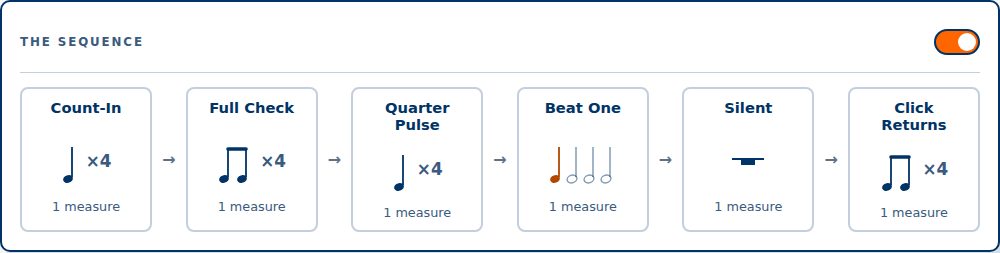
The controls, in full
| Setting | What you hear during a check measure |
|---|---|
| Quarters | The beat only. |
| Eighths | Two per beat. |
| Triplets | Three per beat. |
| 16ths | Four per beat. |
| 5-lets | Five per beat. |
| 6-lets | Six per beat. |
| Sequence | The cycle |
|---|---|
| Three On / One Off | Three checked measures, then one silent. The gentlest starting point. |
| Two On / Two Off | Equal time with and without the check. |
| One On / One Off | Alternating every measure — the least support per unit of time. |
| Drop the Check | The silence grows as the cycle repeats. |
| Hold the Pocket | Long stretches of silence against short checks. |
| Custom | Set the checked and silent measure counts yourself. |
| Control | Choices |
|---|---|
| Count-in | Off, First time, or Every time — at 1, 2, 3 or 4 bars. |
| Loop | Repeat the cycle until you stop it. |
| Show pulse during silence | A visual beat indicator through the silent measures. Leave it off for the hardest version. |
Challenge mode
Challenge runs a fixed number of cycles — 2, 4, 6 or 8 — and then asks you one honest question about what just happened. You answer Locked in or Lost the pulse.
You are the judge, and that is deliberate. The app cannot hear you, so the self-report is the whole result. It is worth answering honestly: “Lost the pulse” at a tempo you thought you owned is the most useful thing this app can tell you.
Keyboard
Space start and pause · S stop · R reset · ↑ ↓ tempo.
A way to work
- Start at Three On / One Off at a tempo you are sure of.
- Move to Two On / Two Off, then One On / One Off, before you touch the tempo.
- Only once One On / One Off is comfortable, raise the tempo — or switch to Drop the Check and let the silence grow instead.
- Turn Show pulse during silence off when you stop needing it. Leaving it on quietly turns the exercise back into following.
Controls and accessibility
Click Drop supports keyboard operation with visible focus, honours the system reduced-motion preference, and lays out for phones, tablets and classroom displays. The setup panel and the sequence preview can each be hidden to leave a clean display while playing.
Privacy
Click Drop has no account and no backend, and does not use your microphone. Settings stay in this browser's local storage and do not leave the device.
Help and feedback
- Report a problem: support@backwerdrhythmshop.com
- Request a feature: feedback@backwerdrhythmshop.com
Include the app name, the build in the footer, the page URL, your browser, what you expected and what happened. Copy details in the app collects most of it for you.
Find out what your time really does.
Set a sequence, drop the click, and keep playing.