
App guide
Count It
See the rhythm. Say the count. Count It builds the connection between written notation and spoken subdivision counting, one clear example at a time.
- Build
2026-08-01.5- Open the app
- count-it.backwerdrhythmshop.com
- Account or install
- None
- Cost
- Free forever
What this app does
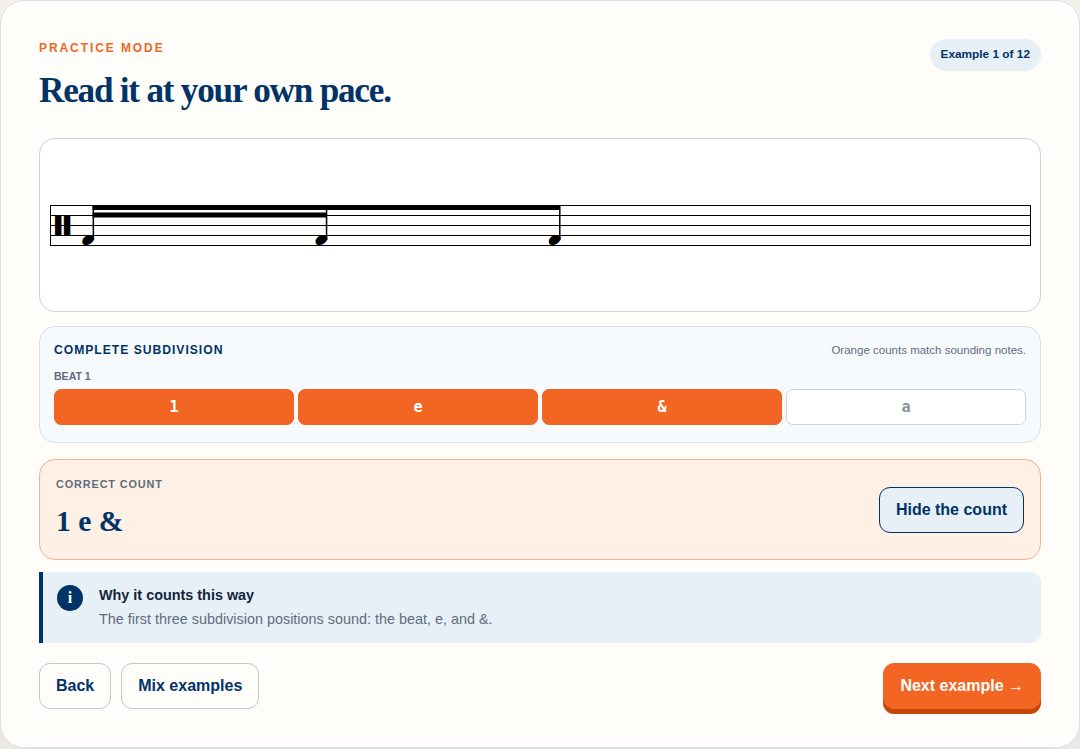
Count It shows you a rhythm and asks what you would say out loud to count it. The rule it teaches is a single one, and the app repeats it in every screen: you count the notes that sound. The complete subdivision grid keeps time underneath every rhythm, but your answer names only the positions where a note begins — rests and held space stay silent.
It uses standard American counting in 4/4, over quarter-, eighth- and sixteenth-note cells.
What you can practice
- Locating each sounding subdivision inside a beat
- Saying a count that matches what is written, not what is nearby
- Keeping the silent positions silent
- Reading a full measure rather than a beat at a time
The two modes
| Mode | What it is |
|---|---|
| Practice | Explore without a score. Work through twelve examples at your own pace, revealing the count when you are ready. |
| Choose the Count | A five-question challenge. You pick the correct count from options and get feedback on each. |
How to use it
- Set your level (below).
- Choose a question size: One beat or One measure.
- Decide whether to show the subdivision guide — the complete 1 e & a printed under the beat.
- Read the rhythm and say the count out loud.
- Only then press Reveal the count and compare.
Say it first. The button is called “Reveal the count” rather than “Show the answer” for a reason — reading a count you have already been shown teaches you almost nothing. Commit out loud, then check.
The levels
| Level | What it adds |
|---|---|
| 1 — Pulse & pairs | The beat and simple pairs. Quarter- and eighth-note material. |
| 2 — Eighth-note placement | Adds the beat and the & as independent sounding positions. |
| 3 — Sixteenth-note cells | The full 1 e & a grid, including cells that start off the beat. |
Working through it
- Start at Level 1, One beat, with the subdivision guide on.
- Turn the guide off at the same level before moving up. Reading without the grid printed is the actual skill.
- Move to One measure before you move to the next level — the jump from a beat to a bar is a different difficulty from the jump from eighths to sixteenths.
- Use Choose the Count to check yourself once a level feels settled. Mix examples reshuffles so you are not learning the order.
Controls and accessibility
Count It supports keyboard operation with visible focus, honours the system reduced-motion preference, and lays out for phones, tablets and classroom displays. A “Skip to the trainer” link is the first thing in the tab order, so keyboard and screen-reader users can bypass the introduction.
Privacy
Count It has no account and no backend. Any settings stay in this browser's local storage and do not leave the device.
Help and feedback
- Report a problem: support@backwerdrhythmshop.com
- Request a feature: feedback@backwerdrhythmshop.com
Include the app name, the build in the footer, the page URL, your browser, what you expected and what happened. Copy details in the app collects most of it for you.
Read it, say it, then check it.
Twelve examples at your own pace, or five questions against the clock of your own honesty.