App guide
Pulse Pocket Metronome
A metronome that shows the rhythm it is playing. Set a different subdivision on every beat, read the counts under the notes, and switch time signatures without stopping.
- Build
2026-09-04- Open the app
- pulse.backwerdrhythmshop.com
- Account or install
- None
- Cost
- Free forever
What this app does
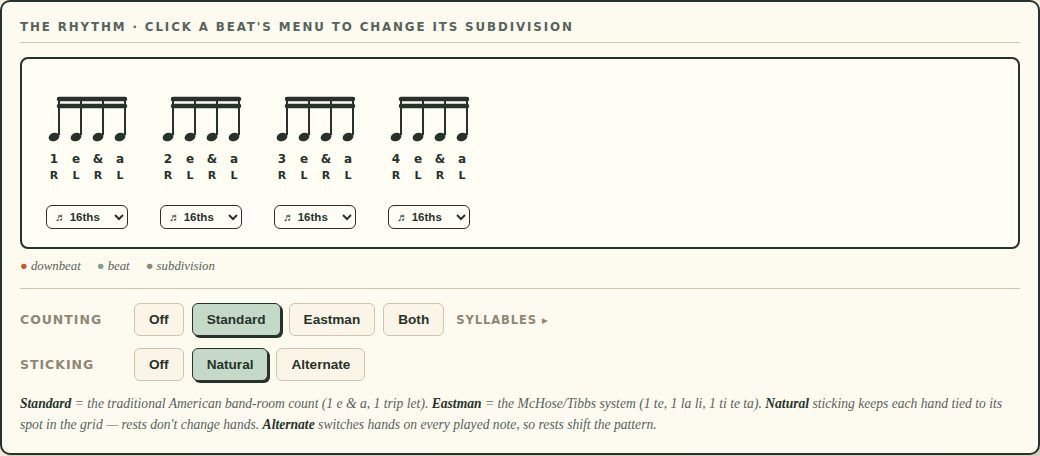
Most metronomes give you one subdivision for the whole bar. Pulse Pocket puts a menu under each beat, so beat 1 can be quarters while beat 3 is triplets — and it draws the result on a staff, with the counting syllables and the stickings underneath.
That makes it a metronome you can read as well as hear, which is what turns it from a timekeeper into a teaching tool.
What you can practice
- Mixed subdivisions inside a single bar
- Counting out loud in a consistent system
- Sticking logic against a written rhythm
- Feeling the difference between 4/4 and cut time at the same tempo
How to use it
- Set the tempo — 30–300 BPM, by slider, by the −5/−1/+1/+5 buttons, or by Tap Tempo.
- Choose a time signature.
- Set the subdivision for every beat at once under Subdivisions, or open the menu under an individual beat on the staff to change just that one.
- Turn on Counting and, if you want them, Stickings.
- Press Play, or Space.
The controls, in full
| Setting | Notes |
|---|---|
| 2/4, 3/4, 4/4 | Simple meters. 4/4 is also labeled C, common time. |
| 2/2 (¢) | Cut time — the same notes as 4/4 but felt in 2, with the half note taking the beat. |
You can switch between these while it plays. Going from 4/4 to cut time at a fixed tempo is the fastest way to hear what “felt in 2” actually means.
| System | What it is |
|---|---|
| Off | No syllables printed. |
| Standard | The traditional American band-room count — 1 e & a, 1 trip let. |
| Eastman | The McHose/Tibbs system — 1 te, 1 la li, 1 ti te ta. |
| Both | Prints the two systems together, for comparing them. |
Under Syllables you can pick which words a given subdivision uses — for triplets, 1 trip let or tri pul let; for the Eastman sixteenth, 1 ti te ta or 1 ta te ta. Set it to match whatever your ensemble already says.
| Mode | What it does |
|---|---|
| Off | No stickings printed. |
| Natural | Each hand stays tied to its position in the grid — rests do not change hands. |
| Alternate | Hands switch on every played note, so rests shift the pattern. |
Patterns and combination rhythms
Once a beat has a subdivision, patterns appear for it. A pattern mixes notes and rests inside the beat; the silent pulses are drawn as hollow noteheads with their counts in parentheses, so the grid stays visible even where nothing sounds. Patterns are grouped by how many notes actually sound.
Combination rhythms are ready-made multi-bar sequences:
- Build-Up — the subdivision densifies bar by bar.
- 16th Combinations — sixteenth-note cells against each other.
- Trips & 16ths — the triplet/sixteenth switch, the one that catches people.
Keyboard
Space play and stop · T tap tempo · R reset · ↑ ↓ tempo.
Controls and accessibility
Pulse Pocket supports keyboard operation with visible focus, honors the system reduced-motion preference, and lays out for phones, tablets and classroom displays. Accents and volume are separately adjustable, and the subdivision and combination sections can each be collapsed.
Privacy
Pulse Pocket has no account and no backend. Settings stay in this browser’s local storage and do not leave the device.
Help and feedback
- Report a problem: support@backwerdrhythmshop.com
- Request a feature: feedback@backwerdrhythmshop.com
Include the app name, the build in the footer, the page URL, your browser, what you expected and what happened. Copy details in the app collects most of it for you.
A metronome you can read.
Set the bar beat by beat, then play it.