
App guide
Rhythm Repper
Make it. Read it. Rep it. Build one measure from real rhythm cells, read it in proper percussion notation, and turn it into a repeatable rep.
- Build
2026-08-01.3- Open the app
- rhythm-repper.backwerdrhythmshop.com
- Account or install
- None
- Cost
- Free forever
What this app does
Rhythm Repper builds a measure beat by beat, and every choice you can make is a complete, correctly notated beat. There are 25 of them per beat — from a plain quarter note through sixteenth rest + three sixteenths to the eighth-note triplet family.
Because the cells are notated units rather than a grid of on/off dots, rests, beams and note values are engraved automatically. You cannot build a measure that would be written wrong.
What you can practice
- Reading correctly beamed notation rather than a grid
- Sticking logic across rests
- Holding a rhythm once the reference subdivision is taken away
- Counting in a system that matches your ensemble's
How to use it
- Under Make, choose a cell for each of the four beats. The filter chips — Quarters, Eighths, Four 16ths, 8th + two, Two + 8th, Offbeats, Rest + three — narrow the list to the family you want.
- Under Read, check the notation, the counting row and the sticking row.
- Under Practice, set the tempo (30–220 BPM), decide what you want to hear, and choose a format.
- Press Start, or Space.
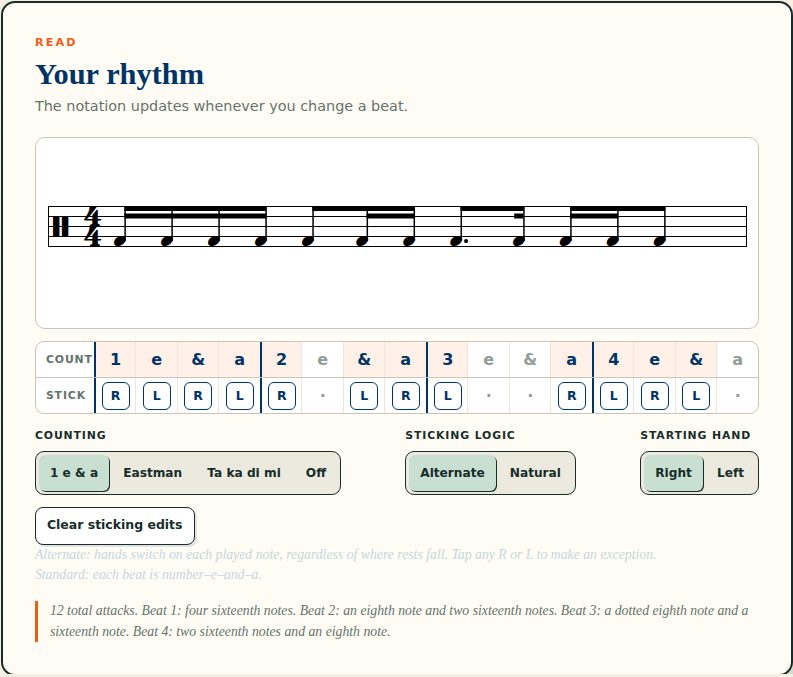
The controls, in full
| System | What it is |
|---|---|
| 1 e & a | Standard American counting — each beat is number–e–and–a. |
| Eastman | The McHose/Tibbs syllables. |
| Ta ka di mi | The Takadimi system. |
| Off | No counting row. |
| Control | Behaviour |
|---|---|
| Alternate | Hands switch on each played note, regardless of where rests fall. |
| Natural | Each hand keeps its place in the grid, so rests do not move the pattern. |
| Starting hand | Right or Left. |
| Exceptions | Tap any R or L to override that one note. Clear sticking edits returns to the rule. |
| Control | Choices |
|---|---|
| Hear | Check only · Rhythm only · Both |
| Subdivision check | Quarters · Eighths · 16ths, with a one-measure count-in |
| Format | Loop, or 4–2–1 — four, then two, then one measure of check and rhythm |
How to use the check
The app prints this lesson on the page, and it is the whole method:
- Listen first. Start with Check only and lock into the pulse.
- Add the rhythm. Choose Both and line every attack up with the check.
- Own the space. Choose Rhythm only — without changing your tempo.
Step three is the test. If the tempo moves when the check disappears, the rhythm was being followed rather than held. Go back to Both rather than pressing on.
Keyboard
Space play and pause · Esc stop.
Controls and accessibility
Rhythm Repper supports keyboard operation with visible focus, honours the system reduced-motion preference, and lays out for phones, tablets and classroom displays. Every beat's cell chooser is a labelled select, and the measure is described in text — “4 total attacks. Beat 1: one quarter note.” — so the notation is not the only way to read it.
Privacy
Rhythm Repper has no account and no backend. Settings stay in this browser's local storage and do not leave the device.
Help and feedback
- Report a problem: support@backwerdrhythmshop.com
- Request a feature: feedback@backwerdrhythmshop.com
Include the app name, the build in the footer, the page URL, your browser, what you expected and what happened. Copy details in the app collects most of it for you.
One measure. Better time.
Build it, read it, and rep it until the check is optional.