
App guide
Rudiment Builder
Learn the name. See the sticking. Build the hands. All forty PAS rudiments, each with its notation, its sticking, and a tempo plan to take it somewhere.
- Build
2026-08-01.8- Open the app
- rudiment-builder.backwerdrhythmshop.com
- Account or install
- None
- Cost
- Free forever
What this app does
Rudiment Builder holds the complete PAS 40 International Drum Rudiments — 15 rolls, 4 diddles, 11 flams and 10 drags. Choose one and the app shows you its notation, its stroke-by-stroke sticking, a short note on what it is actually asking your hands to do, and a suggested tempo range. Then it drills it.
Definitions follow the PAS 40 (1984), rooted in the N.A.R.D. Standard 26 (1933). Each rudiment carries its PAS number and difficulty level.
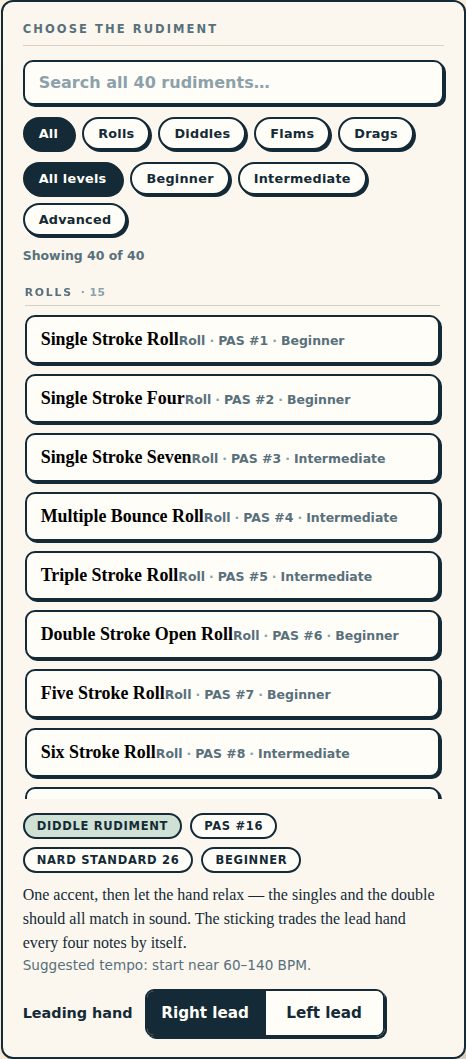
Finding a rudiment
Three ways, and they combine:
- Search by name.
- Filter by family — All, Rolls, Diddles, Flams, Drags.
- Filter by level — All levels, Beginner, Intermediate, Advanced.
The count above the list tells you how many rudiments the current filters leave — “Showing 40 of 40” when nothing is filtered.
Reading the sticking
The sticking panel prints one stroke per position with the counting underneath, and marks what each stroke is:
| Mark | Meaning |
|---|---|
| > | Accent |
| L · R | Which hand plays the stroke |
| flam | Grace note |
| diddle | The second of a doubled pair |
| · | Rest, or ring |
Switch the leading hand between right lead and left lead and the whole pattern mirrors. Practising the non-dominant lead is usually where the actual work is.
The three practice modes
| Mode | What it does | Settings |
|---|---|---|
| Fixed | Loops the rudiment at one tempo until you stop it. Nudge the tempo while playing and the change lands at the next cycle. | Tempo, 30–300 BPM |
| Ladder | Climbs from a starting tempo to an ending tempo in steps, holding each for a set number of repetitions. | Starting and ending BPM, BPM step (1–60), reps per tempo (1–64) |
| Open-Close-Open | The traditional rudimental exercise: open slow, accelerate to a peak, and come back down. | Starting and peak BPM, BPM step, reps per tempo |
A four-beat count-in leads you in, and the panel tells you how long a cycle is — “One cycle = 2 beats”.
Two clicks, and when to use which
- Pulse under the sticking — a soft click on every beat.
- Downbeat cue — a soft tick on beat one of every cycle. It is covered while the pulse is on.
Start with the pulse. Move to the downbeat cue alone once the rudiment is even, so you are holding the internal subdivision rather than being handed it.
Sharing a drill
Copy link produces a URL carrying the rudiment, the leading hand, the practice mode and all of its tempo settings — one exact drill, assignable to a student who needs no account to open it.
Keyboard
Space starts and pauses · R resets.
Controls and accessibility
Rudiment Builder supports keyboard operation with visible focus, honours the system reduced-motion preference, and lays out for phones, tablets and classroom displays. The sticking is exposed to screen readers stroke by stroke — “Stroke 1: Right, accented. Stroke 2: Left. Stroke 3: Right, diddle.” — rather than as an image. There is a full-screen mode for stand or projector use.
Privacy
Rudiment Builder has no account and no backend. Settings stay in this browser's local storage and do not leave the device.
Help and feedback
- Report a problem: support@backwerdrhythmshop.com
- Request a feature: feedback@backwerdrhythmshop.com
Include the app name, the build in the footer, the page URL, your browser, what you expected and what happened. Copy details in the app collects most of it for you.
Forty rudiments, one at a time.
Find it, read the sticking, and put it on a ladder.