App guide
Grid Board
Choose. Project. Play. Grid Board builds a classroom-ready timing grid in seconds, so you stop flipping through packets and redrawing grids on the whiteboard.
- Build
2026-08-01.3- Open the app
- gridboard.backwerdrhythmshop.com
- Account or install
- None
- Cost
- Free forever
What this app does
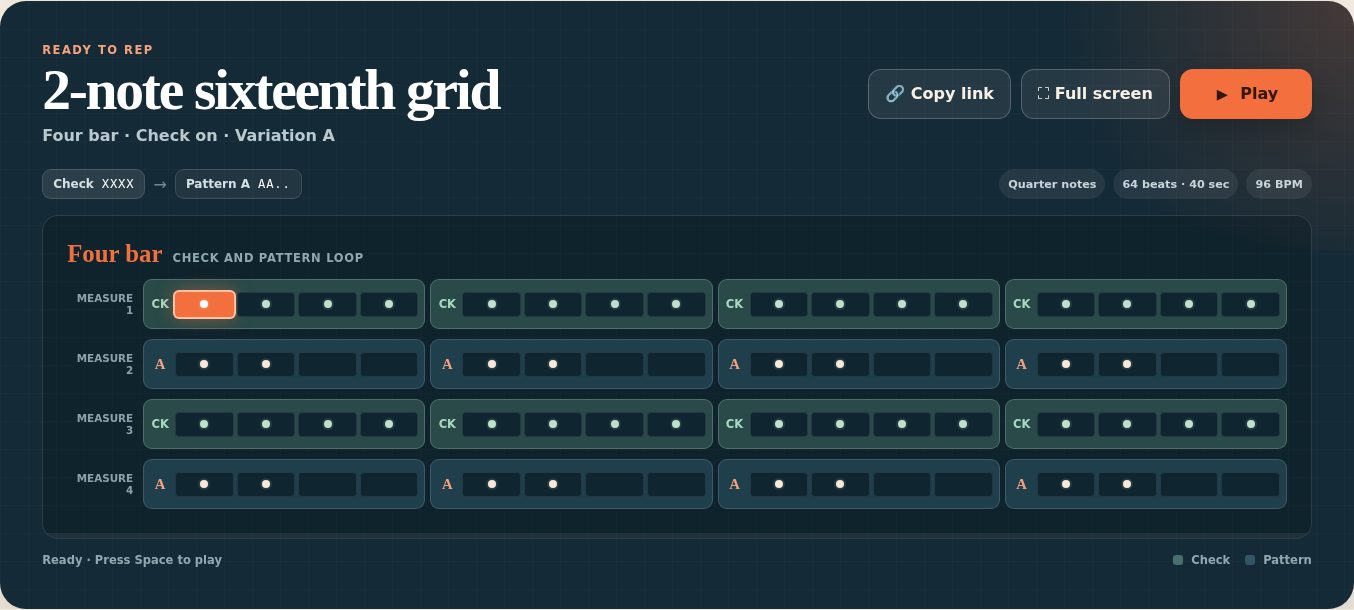
A Grid Board rep is two rows: a Check row, which is the reference subdivision, and a Pattern row, which is the figure the players are working on. The app lays them out as a grid, puts it on the projector at a readable size, and plays it at a tempo you set.
It is built for the front of a room. The display is dark so it survives the lights being on, and every element is sized to be read from the back row.
What you can practice
- A single subdivision cell, taken slowly and then up to tempo
- Ensemble alignment against a common check
- The 4–2–1 form, where the same figure compresses
- Reading the same rhythm written three different ways
How to use it
- Build the rep. Set the subdivision, the grid size, and how it is written.
- Choose the exercise form — Four bar or 4–2–1 — and a variation.
- Set the tempo, 30–220 BPM.
- Press Full screen, then Play (or Space).
The controls, in full
| Control | Choices | What it changes |
|---|---|---|
| Subdivision | 16ths · Triplets | How the beat divides. |
| Grid size | 1-note · 2-note · 3-note | How many partials sound in each mask. |
| Written as | Quarter · Eighth · 16th notes | The notated spelling only. BPM stays on the quarter-note pulse either way. |
“Written as” does not change what you hear. It rewrites the same rhythm at a different note value — which is exactly the point when a section can play a figure in sixteenths but freezes when it appears as eighths.
| Control | Choices |
|---|---|
| Form | Four bar — check and pattern alternate by the measure. 4–2–1 — four measures each, then two, then one. |
| Variation | A, B, C, D — four different masks at the chosen grid size. |
| Order | Which of the two figures leads, e.g. 1ea before 1&a or the reverse. |
| Check | On, or full sixteenths underneath. |
Saving and sharing
Save names the current rep and keeps it under Saved reps. Presets live in this browser only — they are not an account, and they do not follow you to the podium laptop.
To move a rep somewhere else, use Copy link. The URL carries the whole setup, so opening it on another machine rebuilds the same board.
Handing off to Tempo Ladder
Practice on Tempo Ladder opens a slow–fast–slow climb built around the tempo you are on and named for the grid you built. Grid Board keeps the figure on the board; Tempo Ladder runs the climb.
That division is deliberate — see the Tempo Ladder guide, which supplies no musical material of its own and expects the exercise to come from somewhere like here.
Controls and accessibility
Grid Board supports keyboard operation with visible focus and honours the system reduced-motion preference. Space plays and stops. The display is designed for projection: dark ground, large cells, and a full-screen mode that removes every control from the board.
Privacy
Grid Board has no account and no backend. Presets and settings stay in this browser's local storage and do not leave the device.
Help and feedback
- Report a problem: support@backwerdrhythmshop.com
- Request a feature: feedback@backwerdrhythmshop.com
Include the app name, the build in the footer, the page URL, your browser, what you expected and what happened. Copy details in the app collects most of it for you.
Put the rep on the board.
Build it in seconds, project it, and play it.