
App guide
Tempo Ladder
One exercise, one controlled climb, one controlled descent. Tempo Ladder manages the tempo so you can keep your hands and your eyes on the music.
- Build
2026-08-01.3- Open the app
- tempoladder.backwerdrhythmshop.com
- Account or install
- None
- Cost
- Free forever
What this app does
Tempo Ladder runs a symmetrical slow–fast–slow tempo sequence and counts it for you. It supplies no musical material. You bring the rudiment, exercise, excerpt, scale, or etude; the app supplies the climb, the count-in, and the tempo changes.
The peak tempo is played exactly once, the descent retraces the climb, and every tempo change lands on a measure boundary — so there is nothing to reach over and adjust mid-exercise.
What you can practice
- Gradual tempo increases and decreases on one piece of material
- Consistency across repeated measures at a fixed tempo
- Physical resets between tempo changes, using Step mode
- Seamless measure-boundary tempo changes, using Nonstop mode
How to use it
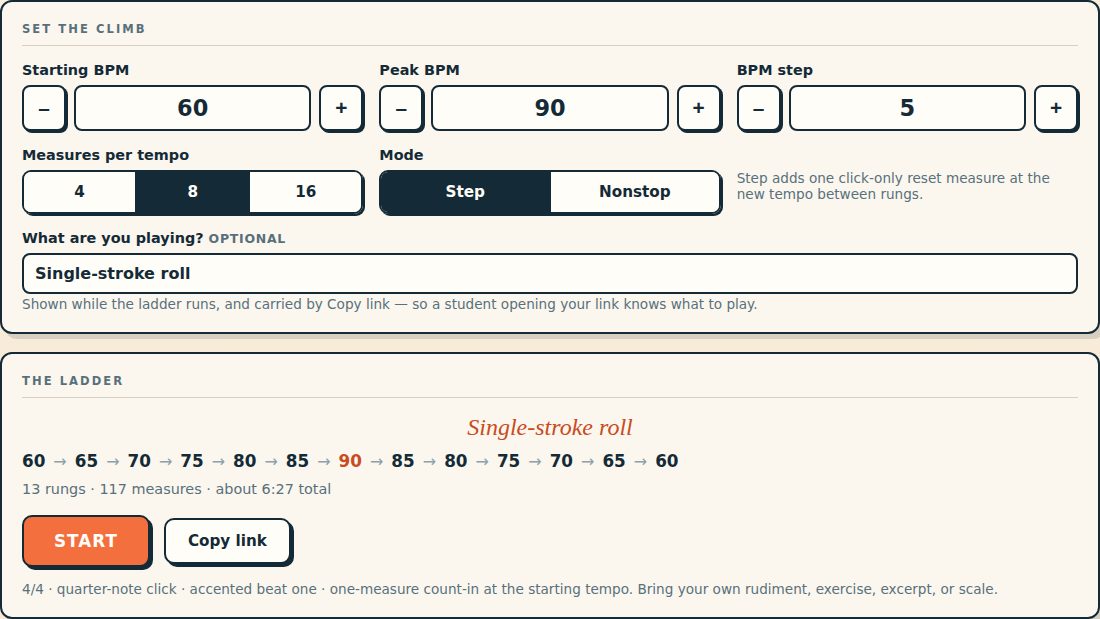
- Set Starting BPM, Peak BPM and BPM step. Each accepts 30–300 BPM; the step accepts 1–30.
- Choose Measures per tempo — 4, 8 or 16.
- Choose Step or Nonstop (below).
- Optionally name what you are playing.
- Read the ladder preview. Before you start, it tells you the rungs, the total measures, and roughly how long the session will take.
- Press Start and play after the one-measure count-in.
The click is a quarter-note pulse in 4/4 with beat one accented, and the count-in runs at the starting tempo.
The two modes
| Mode | What happens between rungs | Use it when |
|---|---|---|
| Step | One click-only reset measure at the new tempo before you play again. | You want a physical reset and a clear count-in for each new speed. |
| Nonstop | No break. The change lands on the measure boundary, and the screen warns you the measure before. | You are building endurance, or rehearsing a passage that cannot stop. |
Name what you are playing
What are you playing? is an optional label on the setup screen — “Line 4”, “single-stroke roll”, “Bach, m. 12”. It stays visible while the ladder runs, appears on the complete screen, and travels with Copy link.
That matters because Tempo Ladder ships no musical content of its own. The label is where the material gets named, so a student opening your link knows what to play rather than only how fast. It is the natural place to write the name of an exercise you built in Grid Board — Grid Board puts the grid on the projector, Tempo Ladder runs the climb.
While the ladder runs
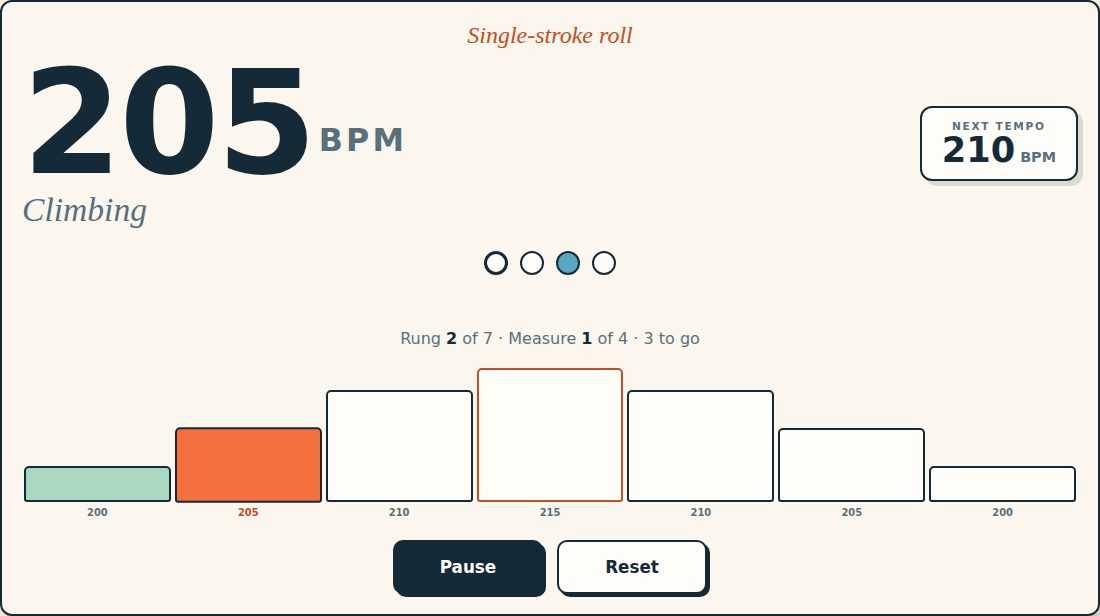
The session screen shows the current tempo in large type, the direction, which rung you are on, the measures remaining, and the tempo coming next.
- Pause and resume in place, without losing your position.
- Reset to return to the start of the ladder.
- Full screen for a music stand or a classroom display.
- At the end, Replay runs the same ladder again; New settings returns you to setup.
Sharing a ladder
Copy link produces a URL carrying the whole setup — tempos, step, measures per tempo, mode, and the exercise label. A student who opens it lands on your exact ladder with nothing to configure and no account to make.
For teachers. The link is the assignment. Send the ladder and the label together and the student cannot practise the right speed on the wrong material.
Controls and accessibility
Tempo Ladder supports keyboard operation with visible focus, honours the system reduced-motion preference, lays out for phones, tablets, music stands and classroom displays, and requests a best-effort screen wake lock while a ladder is running so the display does not sleep mid-session.
Privacy
Tempo Ladder has no account and no backend. Your settings stay in this browser's local storage and do not leave the device.
Help and feedback
- Report a problem: support@backwerdrhythmshop.com
- Request a feature: feedback@backwerdrhythmshop.com
When reporting a problem, include the app name, the build shown in the app's footer, the page URL, your browser, what you expected, and what happened instead. The app's Copy details button collects most of that for you.
Build your next clean tempo climb.
Choose the exercise, set the ladder, and let the app manage the changes.