
App guide
Scale Trail
Build the key. Learn the path. Scale Trail turns key signatures into physical routes across the bars — the same shape whether you play marimba, xylophone, vibraphone or bells.
- Build
v1.3.0- Open the app
- scale-trail.backwerdrhythmshop.com
- Account or install
- None
- Cost
- Free forever
What this app does
Scale Trail teaches major scales across fifteen keys — including the enharmonic spellings, so C♭, G♭ and F♯ are separate journeys rather than the same one relabeled.
Each question asks you to lay out a route on a two-octave keyboard map. The app checks the route, explains it when you ask, and records what you have shown it.
What it will not claim. Scale Trail scores knowledge only — never tone, sticking, motion, or live performance. Its own cards say so, and the Trail Atlas is written to keep “completed” and “shown in play” apart on purpose. Nothing in it claims permanent mastery.
The two modes
| Mode | What it is |
|---|---|
| Practice Mode | Explore at your pace. Choose the key, the exercise and the support level, and work. |
| Finish the Trail | A journey — eight stages by default — across a route of keys. |
The four exercises
| Exercise | What it asks |
|---|---|
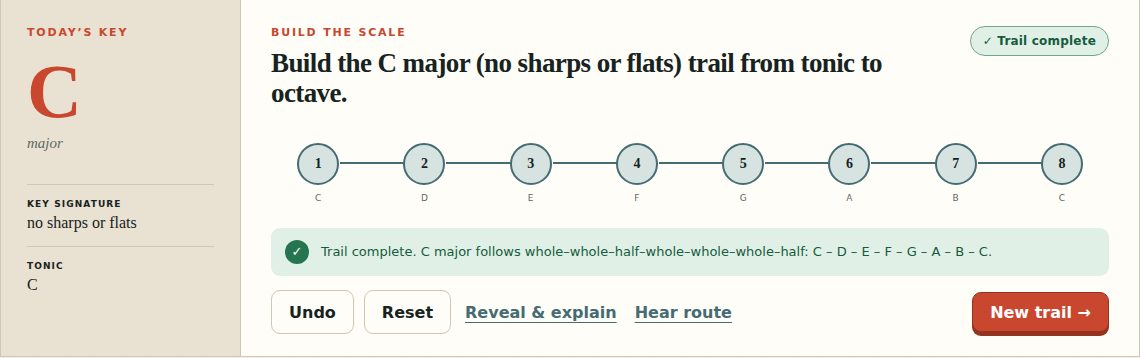
| Build the Scale | Lay the whole trail from tonic to octave, degree by degree. |
| Missing Step | One degree is absent from a given route. Find it. |
| Wrong Turn | One degree is wrong. Find it and repair it. |
| Degree Hunt | Name or find a specific scale degree directly. |
Support levels
This is the difficulty control, and it is the setting most worth being deliberate about.
| Level | What it gives you |
|---|---|
| Guided Route | The most scaffolding — bar labels and route hints in place. |
| Independent Wayfinding | Fewer signposts. You navigate from the key signature. |
| Transfer & Spelling | The hardest: correct spelling required, with the labels reduced. |
There is a separate bar labels toggle as well, so you can take the names away without changing the exercise itself.
The tools on a question
- Undo — take back the last bar you placed.
- Reset — clear the route and start it again.
- Reveal & explain — show the correct route and why. Revealing is recorded; a journey completed without any reveals earns a different mark from one completed with them.
- Hear route — play the route back.
The keyboard map can be played with keys 1–g as well as tapped; each bar shows its own key.
Skill cards and the Trail Atlas
Both live on this device only. There is no account and no cloud, and Reset local progress clears everything.
The Atlas separates two kinds of mark, and the distinction is the point:
- Journey completed — you finished a route. First Footstep, Epic Journey, and the story relics from Classic Trail, Ocean Odyssey and Medieval Quest.
- Shown in play — you answered correctly, repeatedly, across more than one key. Scale Builder, Missing-Step Finder, Route Repairer, Degree Detective, and the geographic marks like Three-Key Compass, Flatland Cartographer and Circle Traveler.
Finishing something and having demonstrated it are different claims, and the Atlas refuses to blur them.
Sharing a drill
Copy practice link carries the key, the exercise, the support level, the route and the journey length. Anyone who opens the link gets that exact drill.
Teachers coming from Mallet Board can send a setup straight here. Note that Scale Trail practices major scales only today: a minor form or an arpeggio arrives as the major scale on the same tonic.
Controls and accessibility
Scale Trail supports keyboard operation with visible focus, honors the system reduced-motion preference, and lays out for phones, tablets and classroom displays. Every bar is a labeled button carrying both its pitch and its keyboard shortcut. Sound can be turned off entirely.
Privacy
Scale Trail has no account and no backend. Skill cards, Atlas marks and settings stay in this browser’s local storage and do not leave the device.
Assign it as a teaching sequence
This app has a free Teaching Sequence: an ordered set of ready-to-assign links that teaches one skill, eight steps long. Copy a step’s link, post it in Google Classroom or Canvas, and every student gets the same questions under the same conditions — no accounts, no sign-in, and nothing about them stored.
C as the on-ramp, then the keys your band actually plays, sharp side after. Each step’s link pins the keys, the support level, the journey length and a seed. Steps two to four are the Bronze scale-club keys, so the sequence lines up with a routine many directors already run.
Help and feedback
- Report a problem: support@backwerdrhythmshop.com
- Request a feature: feedback@backwerdrhythmshop.com
Include the app name, the build in the footer, the page URL, your browser, what you expected and what happened.
Turn a key signature into a route.
Fifteen keys, four exercises, and a support level you can keep lowering.