
App guide
Mallet Board
Put the path on the board. Choose a scale, and Mallet Board draws where it physically lies on the instrument your students are standing at.
- Build
v1.5.0- Open the app
- mallet-board.backwerdrhythmshop.com
- Account or install
- None
- Cost
- Free forever
What this app does
Mallet Board is a teaching display, not a student drill. It shows one keyboard percussion instrument at its real range, lights the bars a chosen scale uses, and plays them. It is designed to be projected while you talk over it.
Its companion, Mallet Map, is the student-facing note-reading trainer. This one is the board at the front of the room.
Choosing what to show
| Control | Choices |
|---|---|
| Instrument | Bells / glockenspiel, xylophone, vibraphone, and marimba in 2-, 3-, 4.3- and 5-octave sizes. Each is drawn at its own real range, and the heading names both the written and the sounding one — bells sound two octaves above the part, xylophone one. |
| Tonic | C, C♯, D♭, D, E♭, E, F, F♯, G♭, G, A♭, A, B♭, B — enharmonics kept separate, so the spelling on the board is the spelling you meant. |
| Scale form | Major, natural minor, harmonic minor, melodic minor. |
| Pattern | Full scale or Tonic arpeggio. |
| Control | Choices |
|---|---|
| Display | Scale path lights the pattern. Free select lets you build any set of bars by tapping them — useful for showing a chord or a passage. |
| Tempo | Slow, Medium, Fast. |
| Direction | Up, Down, Up & down. |
| Play as | Notes one at a time, or Chord all together. |
| Labels | Note names and Scale degrees toggle independently — either, both, or neither. |
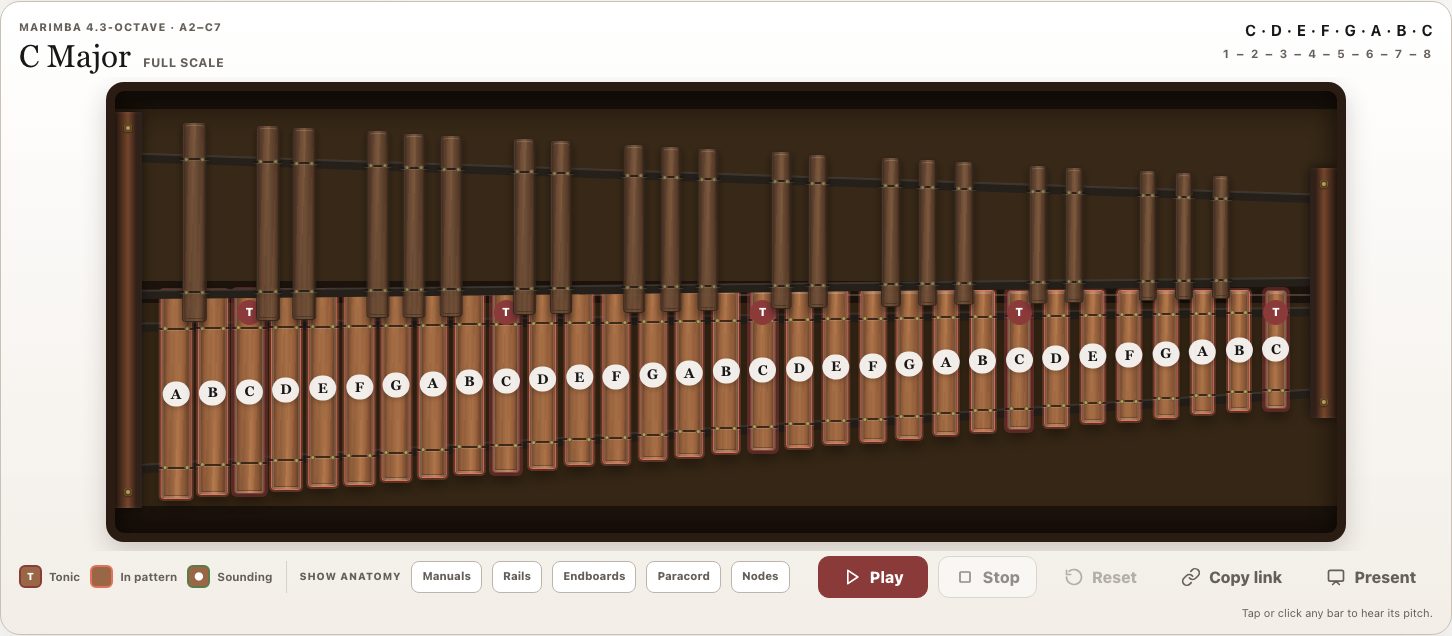
The board marks the tonic with a T, fills the bars that are in the pattern, and lights whichever bar is sounding. Tap or click any bar at any time to hear its pitch, whether or not it is in the pattern.
Play it from a MIDI keyboard
Plug a MIDI keyboard into the computer and press Connect. Play, and the matching bar sounds and lights — as hard or as softly as you struck it. Bars stay lit through the note’s ring rather than until you lift the key, because that is what a mallet instrument does.
Connect is a button on purpose. Browsers will not let a page make sound until someone clicks something, and an incoming MIDI note does not count. That click is what turns the sound on. Press it once when you sit down and everything after it works.
After the first time, the board remembers and reconnects on its own when you come back. The bars light straight away; sound still waits for your first click on the page, which choosing a scale supplies. Pressing Disconnect stops it reconnecting until you ask again.
| Control | What it does |
|---|---|
| Connect | Asks the browser for MIDI access, binds every attached keyboard, and turns the sound on. Keyboards switched on afterwards are picked up on their own. |
| Octave | Each instrument starts at its own transposition, so playing written middle C lights the bar your students read — on bells that is two octaves up, on xylophone one. Adjust it by up to three octaves either way when a short controller cannot reach; the setting belongs to that instrument alone, so changing bells does not follow you to a marimba. A note that still lands off the instrument is named, along with the setting that would reach it. |
| MIDI does | Play sounds and lights the bar. Select, in Free select only, puts the notes you play onto the board instead: play a chord and every one of its bars lights at once, play it again and they come back down. |
Select is the quickest way to show a section the notes they should have played — or the ones they should have avoided — without reaching for the mouse. Your keyboard keeps working in Present mode.
Bluetooth keyboards
Bluetooth works exactly like USB, with one extra step that happens outside the browser: pair the keyboard with your computer first. Mallet Board names the place to do it for the machine you are on.
| System | Where |
|---|---|
| macOS | Audio MIDI Setup → Window → Show MIDI Studio, then the Bluetooth icon. It is buried; that path is the whole trick. |
| Windows | Settings → Bluetooth & devices. |
| ChromeOS | Settings → Bluetooth. |
| Android | Your usual Bluetooth settings. |
| iPhone / iPad | Bluetooth MIDI normally needs a separate pairing app, and Safari support is unconfirmed. Use USB, or a laptop, if you can. |
Once paired, the board picks the keyboard up on its own — there is no need to press Connect again. If a Bluetooth keyboard nods off mid-class, the board says so by name and reconnects when it wakes.
Which browsers. MIDI needs Chrome, Edge, or Firefox. Safari support is unconfirmed, so test it before relying on it in a classroom. Where MIDI is unavailable the controls simply do not appear, and tapping bars works exactly as it always has.
Show anatomy
Five overlays name the parts of the instrument on the drawing itself: Manuals, Rails, Endboards, Paracord and Nodes.
The nodes overlay is the one worth planning a lesson around: it shows where the bar is suspended, which is exactly where not to strike. It turns “play in the center” from an instruction into a diagram.
Present mode
Present strips the controls and leaves the board. Use it once the setup is right and you want the room looking at the instrument rather than at the settings.
Handing off to Scale Trail
Practice this in Scale Trail sends the current setup to the student-facing trainer, and the link back restores this display.
One thing to know before you use it. Scale Trail practices major scales today. If you hand it a minor form or an arpeggio, it opens the major scale on the same tonic. That is a deliberate fallback rather than an error — but it means the students may not be drilling the thing you were just showing.
Copy link shares the Mallet Board display itself, with every setting in place.
Controls and accessibility
Mallet Board supports keyboard operation with visible focus and honors the system reduced-motion preference. Every bar is a labeled button — a bar outside the current pattern announces itself as such — so the board can be read and played without a pointer. It is laid out for projection and for tablets.
Privacy
Mallet Board has no account and no backend. Settings stay in this browser’s local storage and do not leave the device.
Help and feedback
- Report a problem: support@backwerdrhythmshop.com
- Request a feature: feedback@backwerdrhythmshop.com
Include the app name, the build in the footer, the page URL, your browser, what you expected and what happened.
Put the path on the board.
Choose the instrument, choose the scale, and show them where it lies.